VPN for banking: How to use ExpressVPN for online banking


You can use ExpressVPN while banking online to add privacy from your internet service provider (ISP) or local network.
Banking websites and apps already encrypt communications between your device and the bank's servers. ExpressVPN provides a separate layer of encryption between your device and the VPN server, helping protect your traffic on the local network without replacing the bank's existing encryption.
This is particularly useful on public, shared, or unfamiliar networks, where it reduces what the network can see about your online activity. It doesn’t protect your bank account itself, so your bank’s authentication and fraud controls still apply.
Why should you use ExpressVPN for banking?
ExpressVPN is particularly useful when you bank on a network you don’t manage yourself, such as Wi-Fi at an airport, hotel, café, or coworking space. You may know very little about how that network is configured or who operates it. Using ExpressVPN gives you more privacy from that local network while you bank.
The Federal Trade Commission (FTC) says widespread HTTPS means public Wi-Fi is usually safe to use, so a VPN adds privacy rather than making an otherwise unsafe banking connection safe.
ExpressVPN can also reduce other risks associated with online banking. If you use Advanced Protection, its malicious-site blocker can prevent your device from connecting to domains on ExpressVPN’s blocklists. This may stop you from opening a phishing site designed to imitate your bank and trick you into entering your login details.
There’s also ExpressKeys, which lets you create and store a unique password for your bank and check whether your saved password is weak, reused, or exposed.
Want more privacy when banking online?
ExpressVPN encrypts your traffic between your device and the VPN server, helping keep your banking connections more private on public and shared Wi-Fi.
Try ExpressVPN with a 30-day money-back guarantee for new users.
Why banks may block or challenge VPN connections
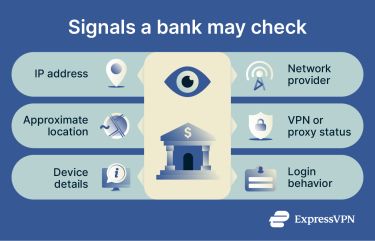
Using ExpressVPN can make a banking login look different from your usual connection because the bank sees the VPN server’s IP address. Banks may consider the IP address, device details, location, account activity, and other signals when deciding whether a login looks familiar or needs another check.
How banks recognize VPN connections
Banks may recognize VPN connections from the VPN server’s public IP address. A bank or fraud-prevention service can compare the public IP address with network-intelligence data to see whether it belongs to a hosting provider, data center, or has previously been identified as a VPN, proxy, or similar service.
Can changing ExpressVPN locations trigger extra verification?
Changing between geographically distant ExpressVPN locations can sometimes lead to extra verification. Banks use different fraud-prevention systems, though, so changing locations won’t always trigger a security check.
If you regularly use ExpressVPN for banking, a Dedicated IP can make your connections more consistent. The IP is assigned only to you and stays the same at its VPN location, which reduces extra verification checks and fraud alerts associated with shared VPN IPs.
How to use ExpressVPN for online banking
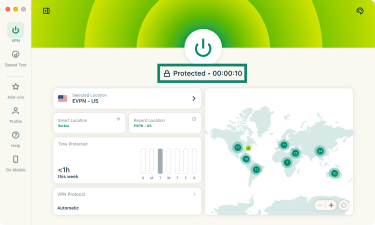
Before opening your banking app or website, check that the Kill Switch is enabled and then connect to a VPN location you normally use.
What to do if your bank doesn’t work with ExpressVPN
If your banking app or website stops working while ExpressVPN is connected, follow these steps to check whether the VPN is causing the issue:
- Disconnect and try again: Turn off ExpressVPN and try accessing your banking app or website. If it still doesn't work, the issue likely isn't related to ExpressVPN, so changing VPN locations probably won't help. Check whether your bank or internet service provider is experiencing service issues.
- Try a different VPN server location: If your bank works without ExpressVPN, reconnect to a VPN server in your bank's country and try again. If you're already connected to a server in that country, try another location in the same country.
- Switch between the app and the website: Try using your banking app or website, or vice versa.
- Check your IP address: Next, while connected to ExpressVPN, use the IP address checker to see whether your IP address matches your selected VPN country. If it doesn't, make a note of the result to share with ExpressVPN Support.
- Temporarily disable Advanced Protection features: Make sure you're using your bank's official app or website, and try turning off features such as Block malicious sites and Block trackers. Try accessing your bank again, then turn these features back on.
- Contact ExpressVPN Support: If your banking app or website still doesn’t work, contact ExpressVPN Support. You can also send your diagnostic information from the ExpressVPN app to help the team investigate.
FAQ
Why does my bank block VPN connections?
A bank may block or challenge a VPN connection when the IP address, apparent location, or other network signals trigger its access or fraud controls. Some fraud systems can also identify VPN-associated IP addresses, but banks don’t all use the same detection methods.
Is it legal to use a VPN for banking?
Using a VPN for online banking is generally lawful where VPN use itself is permitted, but VPN laws and banking policies vary by location. Using a VPN doesn’t override local law or the terms that apply to your bank account.
What should I do if my bank locks me out while I’m using a VPN?
If your bank locks your account or requests identity verification while you’re using a VPN, follow the bank’s verification or account-recovery process first. If access is restored but the service still fails only when ExpressVPN is connected, use the VPN troubleshooting steps above.
Is online banking safe without a VPN?
Yes, online banking can be safe without a VPN because banking services already use encrypted connections and other account-security measures. A VPN primarily adds network privacy.
Should I use a VPN for mobile banking?
You don’t need a VPN for every mobile banking session, but ExpressVPN can add network privacy, particularly on public or unfamiliar Wi-Fi. The banking app continues to use its own encrypted connection and account-security measures, while ExpressVPN protects traffic between your device and the VPN server.
Can I use a VPN to bank in another country?
A VPN doesn’t guarantee that you’ll be able to access your bank from another country. VPN laws, banking-service availability, and bank policies vary by location, and a changed IP address or apparent location may lead to additional verification.
Does ExpressVPN hide my banking activity from my bank?
No, ExpressVPN doesn’t hide your banking activity from the bank itself. Once you sign into your account, the bank still knows which account you’re using and can see the activity performed within it. ExpressVPN changes the public IP address presented to the service and what the local network or ISP can observe; it doesn’t make you anonymous to a service you’ve authenticated with.
Does ExpressVPN interfere with bank security?
ExpressVPN doesn’t interfere with bank security measures, nor does it disable or bypass them. Your bank can still ask for a one-time code, use biometric login, monitor account activity, send fraud alerts, or ask you to confirm your identity.