Do I need a VPN? Who needs one, and what ExpressVPN protects


You can benefit from a VPN if you want to make it harder for websites to link your online activity to your IP address or protect your data on public Wi-Fi.
ExpressVPN encrypts traffic between your device and its server, so others can't read your data if they intercept the connection. It also replaces your IP address, so websites see ExpressVPN server’s IP address instead of yours. This adds a layer of privacy to your internet use, though it doesn’t make you completely anonymous online.
Who needs a VPN?
A VPN is most useful for:
- Public Wi-Fi users: Airport, café, and hotel Wi-Fi networks are shared with strangers and run by operators you don’t know. On these networks, others may be able to see which sites a device connects to, and a fake hotspot can redirect visitors to malicious sites.
- Travelers: People who often travel rely on different networks throughout the day to check bank accounts, access work tools, and stay in touch. A VPN helps keep their Wi-Fi use and logins protected and can help travelers access services while abroad, although some services may restrict VPN connections.
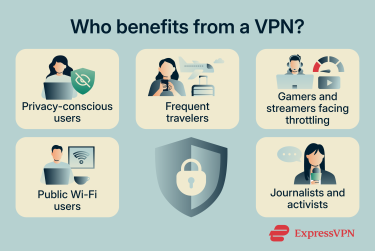
- Privacy-focused users: Even when a site uses HTTPS, the internet service provider (ISP), mobile carrier, or network operator can still see that a user visited it. Privacy-focused users rely on a VPN to limit how much of their browsing history these companies can collect.
- Users facing ISP activity-based throttling: Some ISPs slow down specific apps or services, like video streaming or online games. In that case, a VPN may help improve speeds. (But it won’t help if the user has reached their data cap or their plan’s speed limit.)
- Journalists and activists: People working with sensitive information may have additional privacy and security needs. A VPN can help protect their internet traffic, mask their IP address, and provide access to websites and services in restrictive environments.
What ExpressVPN protects against
Visibility into your browsing
Your ISP and network operators can see which services you access because they can see the IP addresses your device connects to. By default, they can also see your Domain Name System (DNS) queries. DNS turns website names into IP addresses, and your device usually sends these lookups to your ISP’s or carrier’s DNS servers.
With ExpressVPN connected, your ISP and network operators see only a connection to a VPN server. They can still see when you connect, how much data you use, and the VPN server’s IP address, but not which websites or apps you access.
ExpressVPN also runs its own private DNS servers, so your DNS lookups go through the encrypted VPN connection to ExpressVPN instead of to your ISP or a third-party DNS provider. Without this, your device could still send lookups to your ISP, revealing which sites you visit even with the VPN on.
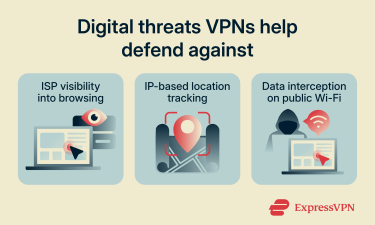
IP-based location tracking
Websites and apps see the IP address your connection comes from. Depending on their privacy policies, they may log it, use it to estimate your country, region, and city, and then use that information for targeted ads or share it with third parties.
With ExpressVPN connected, websites see the VPN server’s IP address instead. They can still log it and estimate a location from it, but that location belongs to the server, not you.
Data interception on public Wi-Fi
On public Wi-Fi, attackers can eavesdrop on an unencrypted network or set up a fake hotspot that impersonates a legitimate one. A fake hotspot puts the attacker between your device and every site you visit, which is known as a man-in-the-middle (MITM) attack.
Most websites and apps use HTTPS, which encrypts the content of your connection, so attackers usually can’t read your passwords or messages. They can still see which services you connect to and read any traffic that isn’t encrypted. On a network they control, they can also use their own DNS servers to redirect you to malicious pages.
ExpressVPN encrypts all traffic between your device and the VPN server, so attackers on the local network can’t see which services you use. Your DNS lookups also travel through the encrypted connection to ExpressVPN’s own DNS servers, which helps prevent the network from redirecting them.
Why trust the VPN provider with your traffic?
With a VPN connected, the VPN provider is in a position to see your traffic instead of your ISP, so it’s worth checking what the provider records and whether independent auditors have verified its claims.
ExpressVPN’s no-logs policy means we don’t record your browsing history, traffic destinations, DNS queries, or the VPN IP address assigned to you. Because these records don’t exist, they can’t be leaked or sold. Independent firms, including KPMG, have audited the policy, so you don’t have to rely on our word alone.
Every ExpressVPN server runs on TrustedServer, technology we built so its servers run entirely on RAM instead of hard drives. Nothing is written to disk, so data can’t build up over time, and a restart wipes everything on the server. Even if someone gained physical access to a server, there would be no stored data to recover.
Additionally, we’re based in the British Virgin Islands, which has no mandatory data retention laws for VPN providers, so we aren’t required to keep logs of your activity. Our transparency report lists the data requests we receive, such as government warrants and Digital Millennium Copyright Act (DMCA) notices. Because we don’t keep activity logs, we have no browsing data to hand over in response.
Do I need a VPN on all my devices?
Protecting your internet traffic on all your devices is generally a good idea. One ExpressVPN subscription covers multiple devices at once, with the exact number depending on your plan.
Phones
Phones switch between Wi-Fi and mobile data throughout the day. On public Wi-Fi, a VPN encrypts your traffic and hides which sites you visit from the network. When you use mobile data, your carrier acts as your ISP and can see which sites you visit, so a VPN mainly adds privacy there. It doesn’t cover regular phone calls or SMS.
Laptops and tablets
Laptops and tablets often connect to café, airport, and hotel Wi-Fi, especially for remote work. On these networks, a VPN encrypts your traffic and hides which sites and work tools you access from anyone else on the network.
Streaming devices and smart TVs
ExpressVPN has apps for various smart TVs, including Android TV, Fire TV, and Apple TV. On these devices, a VPN keeps your ISP from seeing which streaming services you use and may help if your ISP slows streaming traffic. Smart TVs that can’t run VPN apps can be covered through a router.
Routers
A VPN on your router covers every device on your home network, including ones that can’t run VPN apps, like gaming consoles, smart speakers, and security cameras. You can set up ExpressVPN manually on a compatible router, or use Fortify, a router created with GL.iNet that has ExpressVPN built in.
How to get started with ExpressVPN
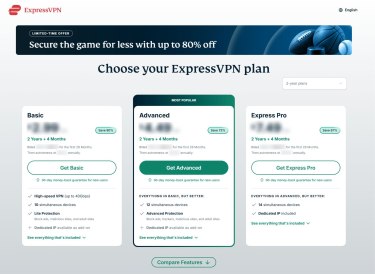
- Choose your desired plan and sign up. Make sure to pick the subscription tier that includes all the features and products you need.
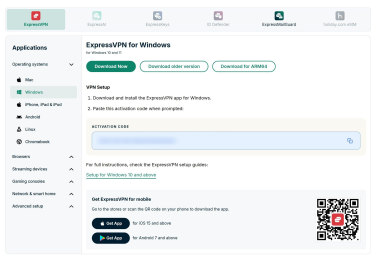
- Sign into your ExpressVPN account and download the app for your device.
- Open the app, sign in, and select the connect button. ExpressVPN picks a server based on your location and network by default. You can also select the server yourself.
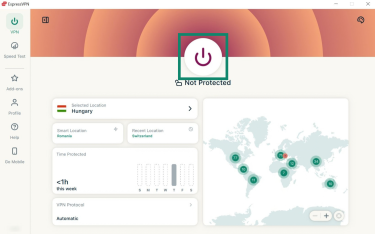
- Check that the app shows you’re connected. To confirm your IP address has changed, use the IP address checker.
For device-specific instructions, see our VPN setup tutorials.
What a regular VPN can't protect against (and which ExpressVPN features can help)
A VPN protects your connection, but some threats don’t depend on the network, such as phishing pages, malware, and breaches at companies that hold your data. For several of these, ExpressVPN plans include separate tools that can reduce your exposure or help you respond.
Phishing and malicious sites
Phishing pages imitate real sites, like banks or delivery services, to trick you into entering passwords or payment details, and they usually arrive through fake messages or dangerous links. A VPN can’t stop you from opening them.
ExpressVPN’s Block malicious sites feature, included on all plans, stops your device from connecting to known phishing, malware, and fraud domains. It only blocks domains on the blocklists it uses, so a new page that isn’t listed yet can still load.
To turn it on, open the ExpressVPN app, go to Add-ons > Advanced Protection, and turn on Block malicious sites.
See the advanced protection guide for more details.
Malware infections
A VPN can’t detect malware or stop malicious code from running on your device. The malicious sites blocker lowers the chance of loading a known malware site, but it doesn’t scan files or remove infections. That’s the job of antivirus software, which covers a different risk from a VPN, so the two work best together.
Trackers
A VPN hides your IP address, but it can’t stop the trackers that advertisers and analytics companies embed in apps and websites. ExpressVPN’s Block trackers feature stops connections to known tracking domains. It’s available on the Advanced and Express Pro plans and is on the same Advanced Protection screen as Block malicious sites.
Block trackers doesn’t stop cookies, browser fingerprinting, or tracking by services you’re signed in to.
Account takeover and weak passwords
Attackers often break into accounts using weak or reused passwords. A VPN can’t help here, because the weakness is in the account, not the network.
ExpressKeys, our password manager, generates strong passwords, flags weak or reused ones, and stores your logins in an encrypted vault. It also generates two-factor authentication (2FA) codes, which add a second step to logging in, so a stolen password alone isn’t enough to access your account. ExpressKeys autofills logins only on the sites they belong to, so a missing autofill prompt can be a sign you’re on a fake page.
It’s included with the Advanced and Express Pro plans and is also available as a separate in-app subscription.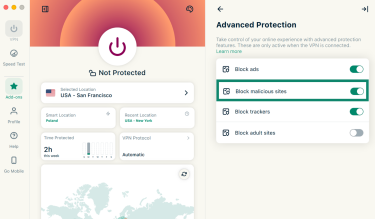
To get started, install the ExpressKeys app for macOS, Android, or iOS, or the extension for Chrome, Edge, Brave, and Firefox. You can also access ExpressKeys from your ExpressVPN account dashboard. Sign in with your ExpressVPN account and add or import your passwords.
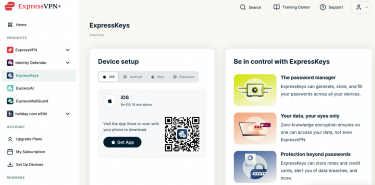
For full setup instructions, see the ExpressKeys Support hub. For a one-off strong password without a password manager, ExpressVPN’s free password generator can create several at once.
Email address exposure
Every service you sign up for gets your email address, and if one of them is breached or sells its data, your inbox can fill with spam and phishing messages. ExpressMailGuard, included on all ExpressVPN plans, lets you sign up with an email alias instead. Messages sent to the alias are forwarded to your real inbox, so the service never sees your real address. If an alias starts getting spam, you can turn it off.
To get started, follow the instructions in our ExpressMailGuard guide.
Data breaches and identity theft
A VPN can’t prevent data breaches, which happen on a company’s own systems. Identity Defender, available to U.S. users on the Advanced and Express Pro plans, alerts you when your personal details appear in a data breach or on the dark web, so you can act quickly. It also sends removal requests to data broker sites, monitors your credit for signs of fraud, and includes ID theft insurance*.
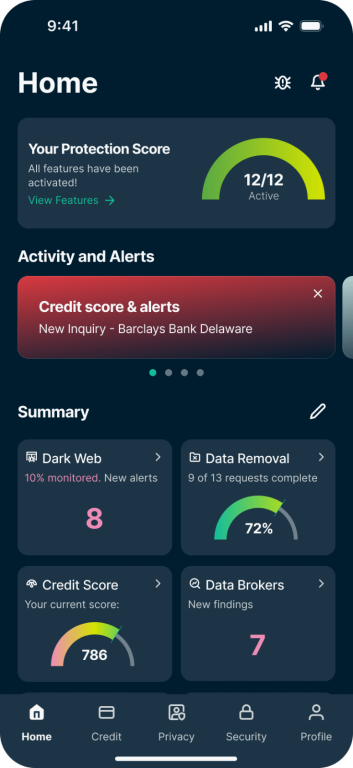
Identity Defender has standalone Android and iOS apps. To get started, follow the instructions in our download tutorial and setup guide.
Ready to take control of your online privacy?
ExpressVPN encrypts your internet traffic and masks your IP address, helping keep your browsing more private from your ISP and people on shared networks. Depending on your plan, you can also get tools to block known malicious sites, manage passwords, and protect your personal information.
Protect your privacy with ExpressVPN
Try ExpressVPN with a 30-day money-back guarantee for new users.
FAQ
Does using a VPN make me a target?
Using a VPN doesn’t single you out because many people use them every day for privacy on public Wi-Fi and at home and businesses rely on VPNs for remote work. VPNs are also legal in most countries.
Is encrypted DNS enough instead of a VPN?
Encrypted DNS isn’t a full replacement for a VPN. It hides your DNS lookups, but your ISP can still see the IP addresses you connect to, and websites still see your real IP address. ExpressVPN includes private, encrypted DNS with its VPN, so there’s nothing extra to set up.
Should I use Tor instead of a VPN?
Tor and a VPN protect your privacy in different ways, so the better choice depends on what you need. Tor sends traffic through several volunteer-run relays, which makes it harder to trace but usually much slower. A VPN sends traffic through one server run by the provider, which is faster but means trusting that provider. You can also use them together by connecting to ExpressVPN before opening Tor Browser.
Does the ExpressVPN browser extension protect apps outside the browser?
The ExpressVPN browser extension protects traffic outside the browser only when it’s paired with the ExpressVPN desktop app (Remote Control Mode). In that setup, the extension controls the app, which covers all your device’s traffic. When the extension runs on its own as a proxy, it protects only browser traffic. You can find details in the browser extension guide.
Do I need a VPN if I use incognito mode?
Incognito mode doesn’t replace a VPN, because it only stops your browser from saving your history, cookies, and site data on your device. Your ISP and the sites you visit can still see your activity and your IP address.
Can I use a VPN for streaming and gaming?
You can use a VPN while streaming or gaming, and it may help if your ISP deliberately slows these activities, since the ISP can’t see what the traffic is. A VPN can also add some delay, especially in online games, so connecting to a nearby server works best.
*The insurance is underwritten and administered by American Bankers Insurance Company of Florida, an Assurant company, under group or blanket policies issued to Array US Inc, or its respective affiliates, for the benefit of its Members. Please refer to the actual policies for terms, conditions, and exclusions of coverage. Coverage may not be available in all jurisdictions. Review the Advanced Tier Summary of Benefits and the Express Pro Tier Summary of Benefits.